
7.4 KiB
Perceiving Humans: from Monocular 3D Localization to Social Distancing
Perceiving humans in the context of Intelligent Transportation Systems (ITS) often relies on multiple cameras or expensive LiDAR sensors. In this work, we present a new cost- effective vision-based method that perceives humans’ locations in 3D and their body orientation from a single image. We address the challenges related to the ill-posed monocular 3D tasks by proposing a deep learning method that predicts confidence intervals in contrast to point estimates. Our neural network architecture estimates humans 3D body locations and their orientation with a measure of uncertainty. Our vision-based system (i) is privacy-safe, (ii) works with any fixed or moving cameras, and (iii) does not rely on ground plane estimation. We demonstrate the performance of our method with respect to three applications: locating humans in 3D, detecting social interactions, and verifying the compliance of recent safety measures due to the COVID-19 outbreak. Indeed, we show that we can rethink the concept of “social distancing” as a form of social interaction in contrast to a simple location-based rule. We publicly share the source code towards an open science mission.
This readme is in Beta version and refers to the update branch. It is currently under development.
Predictions
For a quick setup download a pifpaf and a MonoLoco++ models from TODO and save them into data/models.
3D Localization
The predict script receives an image (or an entire folder using glob expressions),
calls PifPaf for 2d human pose detection over the image
and runs Monoloco++ for 3d location of the detected poses.
The command --net defines if saving pifpaf outputs, MonoLoco++ outputs or MonStereo ones.
You can check all commands for Pifpaf at openpifpaf.
Output options include json files and/or visualization of the predictions on the image in frontal mode,
birds-eye-view mode or combined mode and can be specified with --output_types
Ground-truth KITTI files for comparing results can be downloaded from
here
(file called names-kitti) and should be saved into data/arrays
Ground-truth files can also be generated, more info in the preprocessing section.
For an example image, run the following command:
python -m monstereo.run predict \
docs/002282.png \
--net monoloco_pp \
--output_types multi \
--model data/models/monoloco_pp-201203-1424.pkl \
--path_gt data/arrays/names-kitti-200615-1022.json \
-o <output directory> \
--long-edge <rescale the image by providing dimension of long side. If None original resolution>
--n_dropout <50 to include epistemic uncertainty, 0 otherwise>
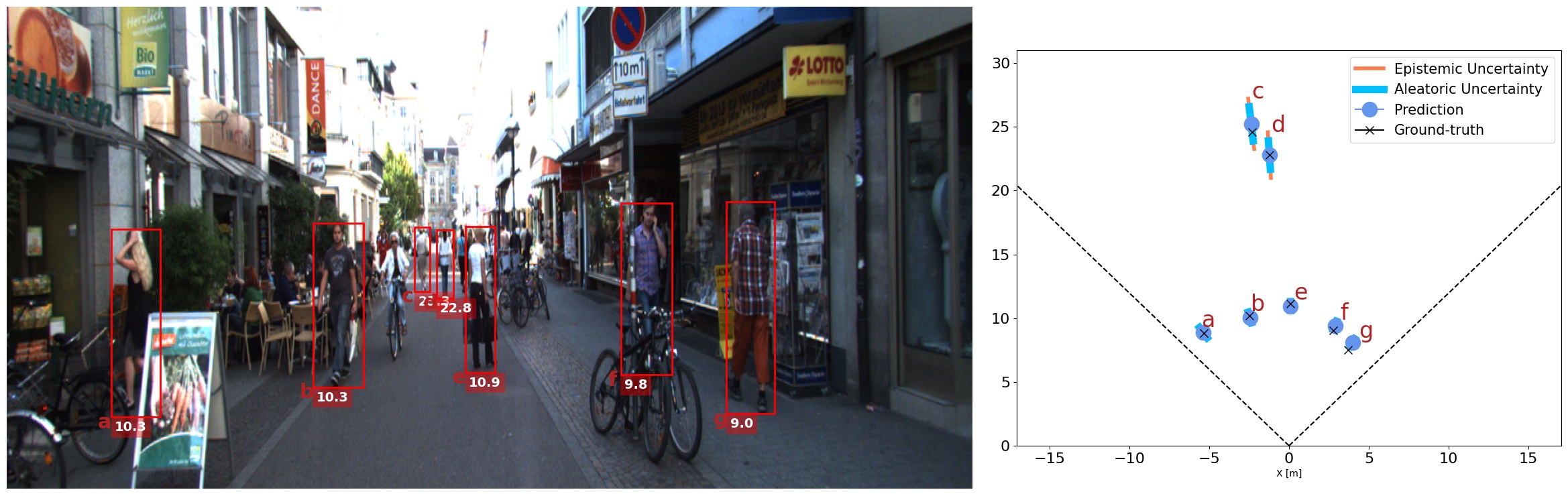
To show all the instances estimated by MonoLoco add the argument show_all to the above command.
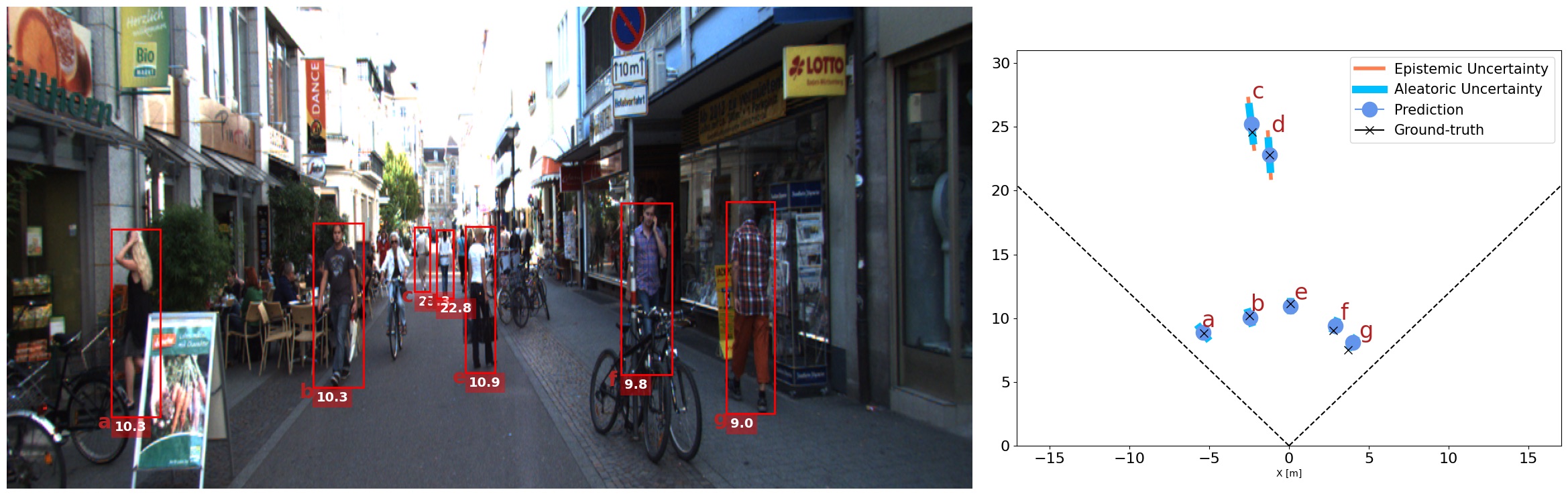
Social Distancing
WIP
Orientation and Bounding Box dimensions
MonoLoco++ estimates orientation and box dimensions as well. Results are saved in a json file when using the command
--output_types json. At the moment, the only visualization including orientation is the social distancing one.
Preprocessing
Kitti
Annotations from a pose detector needs to be stored in a folder. For example by using openpifpaf:
python -m openpifpaf.predict \
--glob "<kitti images directory>/*.png" \
--json-output <directory to contain predictions>
--checkpoint=shufflenetv2k30 \
--instance-threshold=0.05 --seed-threshold 0.05 --force-complete-pose
Once the step is complete:
python -m monstereo.run prep --dir_ann <directory that contains predictions> --monocular
Collective Activity Dataset
To evaluate on of the collective activity dataset (without any training) we selected 6 scenes that contain people talking to each other. This allows for a balanced dataset, but any other configuration will work.
THe expected structure for the dataset is the following:
collective_activity
├── images
├── annotations
where images and annotations inside have the following name convention:
IMAGES: seq<sequence_name>_frame<frame_name>.jpg ANNOTATIONS: seq<sequence_name>_annotations.txt
With respect to the original datasets the images and annotations are moved to a single folder and the sequence is added in their name. One command to do this is:
rename -v -n 's/frame/seq14_frame/' f*.jpg
which for example change the name of all the jpg images in that folder adding the sequence number
(remove -n after checking it works)
Pifpaf annotations should also be saved in a single folder and can be created with:
python -m openpifpaf.predict \
--glob "data/collective_activity/images/*.jpg"  \
--checkpoint=shufflenetv2k30 \
--instance-threshold=0.05 --seed-threshold 0.05 --force-complete-pose\
--json-output /data/lorenzo-data/annotations/collective_activity/v012
Finally, to evaluate activity using a MonoLoco++ pre-trained model trained either on nuSCENES or KITTI:
python -m monstereo.run eval --activity \
--net monoloco_pp --dataset collective \
--model <MonoLoco++ model path>  --dir_ann <pifpaf annotations directory>
Training
We train on KITTI or nuScenes dataset specifying the path of the input joints.
Our results are obtained with:
python -m monstereo.run train --lr 0.001 --joints data/arrays/joints-kitti-201202-1743.json --save --monocular
For a more extensive list of available parameters, run:
python -m monstereo.run train --help
Evaluation
3D Localization
We provide evaluation on KITTI for models trained on nuScenes or KITTI. We compare them with other monocular and stereo Baselines:
MonoLoco, Mono3D, 3DOP, MonoDepth MonoPSR and our MonoDIS and our Geometrical Baseline.
- Mono3D: download validation files from here
and save them into
data/kitti/m3d - 3DOP: download validation files from here
and save them into
data/kitti/3dop - MonoDepth: compute an average depth for every instance using the following script
here
and save them into
data/kitti/monodepth - GeometricalBaseline: A geometrical baseline comparison is provided.
Download the model for monoloco
The average geometrical value for comparison can be obtained running:
python -m monstereo.run eval
--dir_ann <annotation directory>
--model <model path>
--net monoloco_pp
--generate
To include also geometric baselines and MonoLoco, add the flag --baselines
Activity Estimation (Talking)
Please follow preprocessing steps for Collective activity dataset and run pifpaf over the dataset images. Evaluation on this dataset is done with models trained on either KITTI or nuScenes. For optimal performances, we suggest the model trained on nuScenes teaser (TODO add link)
python -m monstereo.run eval
--activity
--dataset collective
--net monoloco_pp
--model <path to the model>
--dir_ann <annotation directory>