| docs | ||
| kitti-eval | ||
| monoloco | ||
| splits | ||
| tests | ||
| .gitignore | ||
| .pylintrc | ||
| .travis.yml | ||
| LICENSE | ||
| LICENSE.AGPL | ||
| README_old.md | ||
| README.md | ||
| setup.py | ||

Monoloco library

This library is based on three research projects:
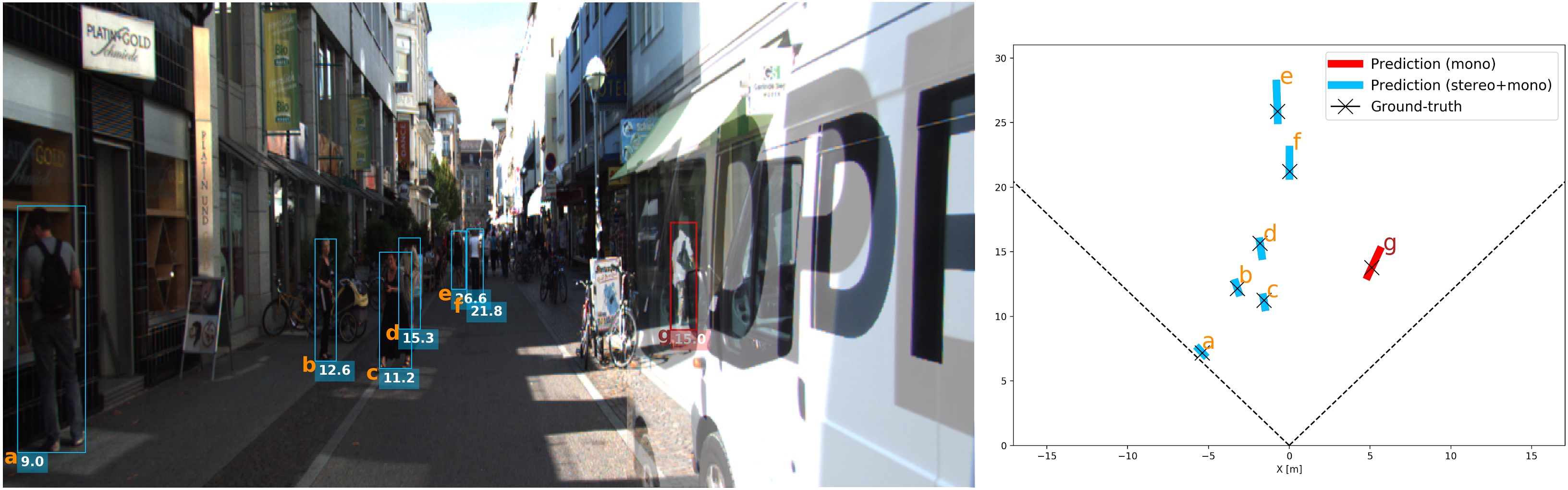
MonStereo: When Monocular and Stereo Meet at the Tail of 3D Human Localization
L. Bertoni, S. Kreiss, T. Mordan, A. Alahi, ICRA21 --> Article,Video
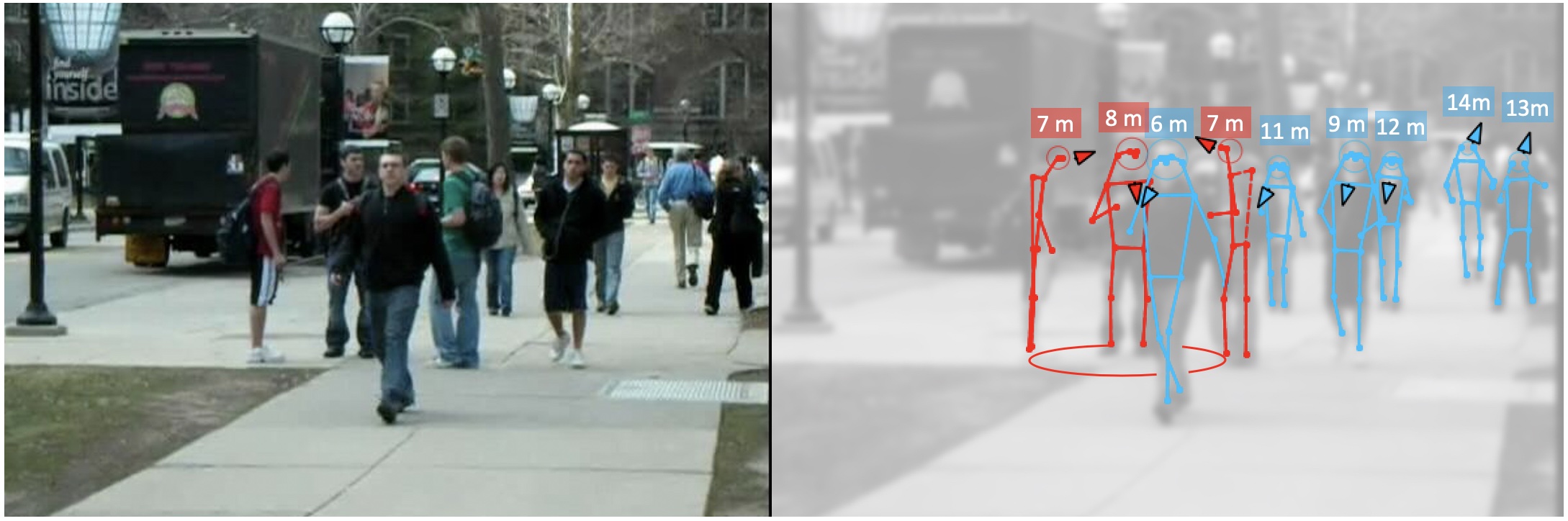
Perceiving Humans: from Monocular 3D Localization to Social Distancing
L. Bertoni, S. Kreiss, A. Alahi, T-ITS 2021 --> Article, Video
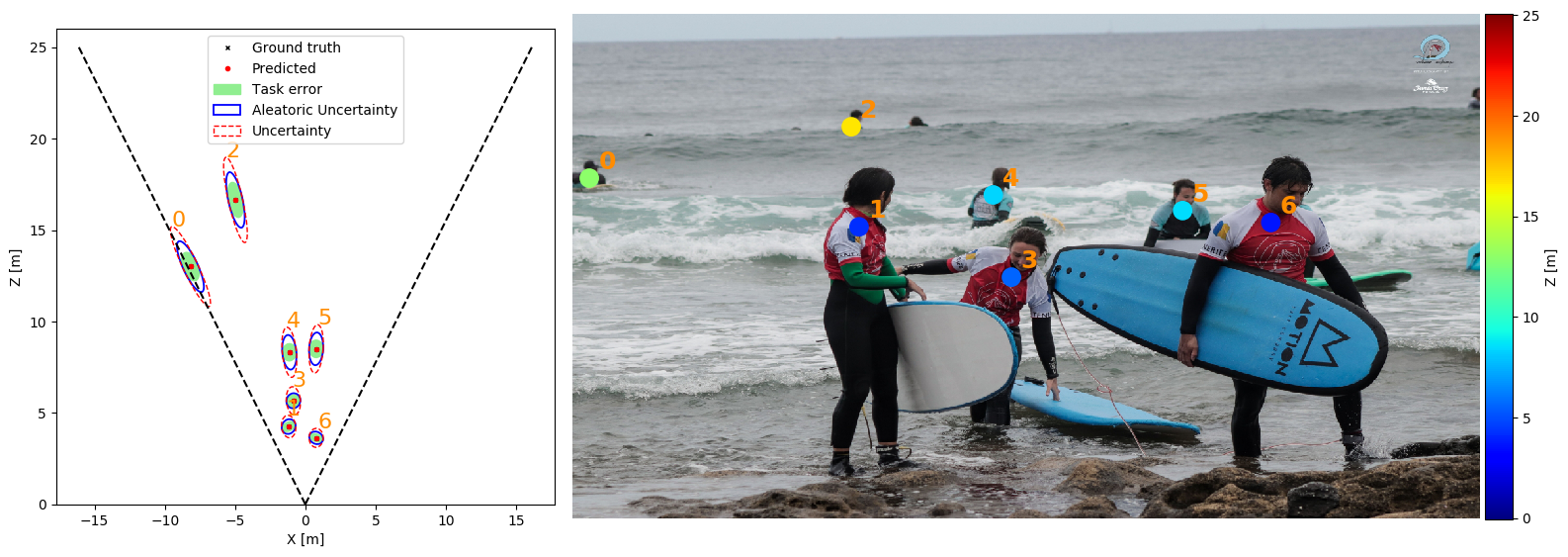
MonoLoco: Monocular 3D Pedestrian Localization and Uncertainty Estimation
L. Bertoni, S. Kreiss, A.Alahi, ICCV 2019 --> Article, Video
All projects are built upon Openpifpaf for the 2D keypoints and share the AGPL Licence.
Quick setup
A GPU is not required, yet highly recommended for real-time performances. The installation has been tested on OSX and Linux operating systems, with Python 3.6, 3.7, 3.8. Packages have been installed with pip and virtual environments.
For quick installation, do not clone this repository, make sure there is no folder named monoloco in your current directory, and run:
pip3 install monoloco
For development of the source code itself, you need to clone this repository and then:
pip3 install sdist
cd monoloco
python3 setup.py sdist bdist_wheel
pip3 install -e .
Interfaces
All the commands are run through a main file called main.py using subparsers.
To check all the options:
python3 -m monoloco.run --helppython3 -m monoloco.run predict --helppython3 -m monoloco.run train --helppython3 -m monoloco.run eval --helppython3 -m monoloco.run prep --help
or check the file monoloco/run.py
Predictions
For a quick setup download a pifpaf and MonoLoco++ / MonStereo models from
here and save them into data/models.
Monocular 3D Localization
The predict script receives an image (or an entire folder using glob expressions),
calls PifPaf for 2d human pose detection over the image
and runs Monoloco++ for 3d location of the detected poses.
The command --net defines if saving pifpaf outputs, MonoLoco++ outputs or MonStereo ones.
You can check all commands for Pifpaf at openpifpaf.
Output options include json files and/or visualization of the predictions on the image in frontal mode,
birds-eye-view mode or combined mode and can be specified with --output_types
Ground-truth KITTI files for comparing results can be downloaded from
here
(file called names-kitti) and should be saved into data/arrays
Ground-truth files can also be generated, more info in the preprocessing section.
For an example image, run the following command:
python -m monstereo.run predict \
docs/002282.png \
--net monoloco_pp \
--output_types multi \
--model data/models/monoloco_pp-201203-1424.pkl \
--path_gt data/arrays/names-kitti-200615-1022.json \
-o <output directory> \
--long-edge <rescale the image by providing dimension of long side. If None original resolution>
--n_dropout <50 to include epistemic uncertainty, 0 otherwise>

To show all the instances estimated by MonoLoco add the argument show_all to the above command.

It is also possible to run openpifpaf directly
by specifying the network with the argument --net pifpaf. All the other pifpaf arguments are also supported
and can be checked with python -m monstereo.run predict --help.

Focal Length and Camera Parameters
Absolute distances are affected by the camera intrinsic parameters.
When processing KITTI images, the network uses the provided intrinsic matrix of the dataset.
In all the other cases, we use the parameters of nuScenes cameras, with "1/1.8'' CMOS sensors of size 7.2 x 5.4 mm.
The default focal length is 5.7mm and this parameter can be modified using the argument --focal.
Social Distancing
To visualize social distancing compliance, simply add the argument --social-distance to the predict command.
An example from the Collective Activity Dataset is provided below.

To visualize social distancing run the below, command:
python -m monstereo.run predict \
docs/frame0038.jpg \
--net monoloco_pp  \
--social_distance \
--output_types front bird --show_all \
--model data/models/monoloco_pp-201203-1424.pkl -o <output directory>


Threshold distance and radii (for F-formations) can be set using --threshold-dist and --radii, respectively.
For more info, run:
python -m monstereo.run predict --help
Orientation and Bounding Box dimensions
MonoLoco++ estimates orientation and box dimensions as well. Results are saved in a json file when using the command
--output_types json. At the moment, the only visualization including orientation is the social distancing one.
Stereo 3D Localization
The predict script receives an image (or an entire folder using glob expressions), calls PifPaf for 2d human pose detection over the image and runs MonStereo for 3d location of the detected poses.
Output options include json files and/or visualization of the predictions on the image in frontal mode,
birds-eye-view mode or multi mode and can be specified with --output_types
Pre-trained Models
- Download Monstereo pre-trained model from
Google Drive,
and save them in
data/models(default) or in any folder and call it through the command line option--model <model path> - Pifpaf pre-trained model will be automatically downloaded at the first run.
Three standard, pretrained models are available when using the command line option
--checkpoint resnet50,--checkpoint resnet101and--checkpoint resnet152. Alternatively, you can download a Pifpaf pre-trained model from openpifpaf and call it with--checkpoint <pifpaf model path>. All experiments have been run with v0.8 of pifpaf. If you'd like to use an updated version, we suggest to re-train the MonStereo model as well. - The model for the experiments is provided in data/models/ms-200710-1511.pkl
Ground truth matching
-
In case you provide a ground-truth json file to compare the predictions of MonSter, the script will match every detection using Intersection over Union metric. The ground truth file can be generated using the subparser
prepand called with the command--path_gt. As this step requires running the pose detector over all the training images and save the annotations, we provide the resulting json file for the category pedestrians from Google Drive and save it intodata/arrays. -
In case the ground-truth json file is not available, with the command
--show_all, is possible to show all the prediction for the image
After downloading model and ground-truth file, a demo can be tested with the following commands:
python3 -m monstereo.run predict --glob docs/000840*.png --output_types multi --scale 2 --model data/models/ms-200710-1511.pkl --z_max 30 --checkpoint resnet152 --path_gt data/arrays/names-kitti-200615-1022.json -o data/output

python3 -m monstereo.run predict --glob docs/005523*.png --output_types multi --scale 2 --model data/models/ms-200710-1511.pkl --z_max 30 --checkpoint resnet152 --path_gt data/arrays/names-kitti-200615-1022.json -o data/output

Preprocessing
Kitti
Annotations from a pose detector needs to be stored in a folder. For example by using openpifpaf:
python -m openpifpaf.predict \
--glob "<kitti images directory>/*.png" \
--json-output <directory to contain predictions>
--checkpoint=shufflenetv2k30 \
--instance-threshold=0.05 --seed-threshold 0.05 --force-complete-pose
Once the step is complete:
python -m monstereo.run prep --dir_ann <directory that contains predictions> --monocular
Collective Activity Dataset
To evaluate on of the collective activity dataset (without any training) we selected 6 scenes that contain people talking to each other. This allows for a balanced dataset, but any other configuration will work.
THe expected structure for the dataset is the following:
collective_activity
├── images
├── annotations
where images and annotations inside have the following name convention:
IMAGES: seq<sequence_name>_frame<frame_name>.jpg ANNOTATIONS: seq<sequence_name>_annotations.txt
With respect to the original datasets the images and annotations are moved to a single folder and the sequence is added in their name. One command to do this is:
rename -v -n 's/frame/seq14_frame/' f*.jpg
which for example change the name of all the jpg images in that folder adding the sequence number
(remove -n after checking it works)
Pifpaf annotations should also be saved in a single folder and can be created with:
python -m openpifpaf.predict \
--glob "data/collective_activity/images/*.jpg"  \
--checkpoint=shufflenetv2k30 \
--instance-threshold=0.05 --seed-threshold 0.05 --force-complete-pose\
--json-output /data/lorenzo-data/annotations/collective_activity/v012
Finally, to evaluate activity using a MonoLoco++ pre-trained model trained either on nuSCENES or KITTI:
python -m monstereo.run eval --activity \
--net monoloco_pp --dataset collective \
--model <MonoLoco++ model path>  --dir_ann <pifpaf annotations directory>
Training
We train on KITTI or nuScenes dataset specifying the path of the input joints.
Our results are obtained with:
python -m monstereo.run train --lr 0.001 --joints data/arrays/joints-kitti-201202-1743.json --save --monocular
For a more extensive list of available parameters, run:
python -m monstereo.run train --help
Evaluation
3D Localization
We provide evaluation on KITTI for models trained on nuScenes or KITTI. We compare them with other monocular and stereo Baselines:
MonoLoco, Mono3D, 3DOP, MonoDepth MonoPSR and our MonoDIS and our Geometrical Baseline.
- Mono3D: download validation files from here
and save them into
data/kitti/m3d - 3DOP: download validation files from here
and save them into
data/kitti/3dop - MonoDepth: compute an average depth for every instance using the following script
here
and save them into
data/kitti/monodepth - GeometricalBaseline: A geometrical baseline comparison is provided.
The average geometrical value for comparison can be obtained running:
python -m monstereo.run eval
--dir_ann <annotation directory>
--model <model path>
--net monoloco_pp
--generate
To include also geometric baselines and MonoLoco, add the flag --baselines

Adding the argument save, a few plots will be added including 3D localization error as a function of distance:

Activity Estimation (Talking)
Please follow preprocessing steps for Collective activity dataset and run pifpaf over the dataset images. Evaluation on this dataset is done with models trained on either KITTI or nuScenes. For optimal performances, we suggest the model trained on nuScenes teaser (TODO add link)
python -m monstereo.run eval
--activity
--dataset collective
--net monoloco_pp
--model <path to the model>
--dir_ann <annotation directory>
Data structure
Data
├── arrays
├── models
├── kitti
├── figures
├── logs
Run the following to create the folders:
mkdir data
cd data
mkdir arrays models kitti figures logs
Further instructions for prediction, preprocessing, training and evaluation can be found here: